
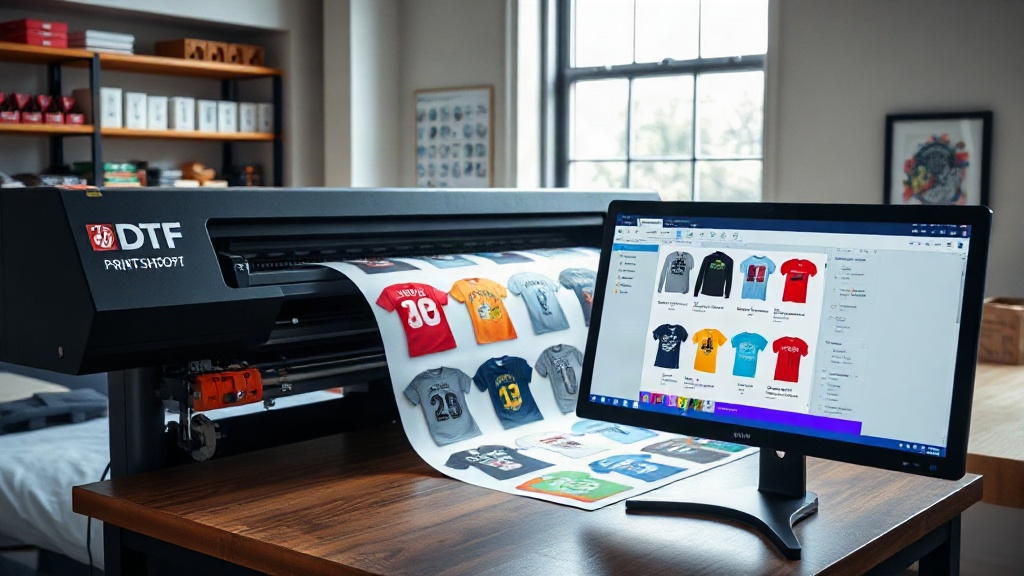
If you're in the custom apparel business, you've likely heard about DTF printing. It's a game-changer for transferring vibrant designs onto various fabrics. But did you know that how you arrange those designs on the transfer film can make or break your efficiency and profitability? Enter the DTF gangsheet builder—a tool that's revolutionizing the way print shops handle multiple designs in one go. In this guide, we'll dive deep into what a gangsheet builder is, why it matters, and how you can leverage it to streamline your operations. Whether you're a seasoned pro or just starting out, mastering this tool will give you a competitive edge.
What Exactly Is a DTF Gangsheet Builder?
First things first: what is a gangsheet? In DTF printing, a gangsheet is a single sheet of transfer film that contains multiple designs arranged together. Instead of printing each design individually, you "gang" them up on one sheet, which is then printed, powdered, and cured in one pass. A DTF gangsheet builder is software that helps you create these gangsheets efficiently. It allows you to import your designs, arrange them optimally, and export a print-ready file. Think of it as a digital canvas where you can drag, drop, and nest your artwork to minimize waste and maximize productivity.
Why is this important? Because DTF printing involves costs for film, ink, powder, and time. The more efficiently you use your materials, the higher your profit margins. A good gangsheet builder automates the arrangement process, ensuring you use every inch of film wisely. Plus, it reduces manual errors and speeds up prepress, so you can focus on printing and fulfilling orders.
Why You Need a DTF Gangsheet Builder
You might be thinking, "I can just arrange designs manually in Photoshop or Illustrator." While that's possible, it's time-consuming and prone to mistakes. Here's why a dedicated DTF gangsheet builder is a smarter choice:
- Time savings: Automated nesting and layout algorithms arrange designs in seconds, not hours.
- Cost reduction: By optimizing film usage, you cut down on waste, which directly lowers your material costs.
- Consistency: Standardized templates ensure every gangsheet meets your quality standards.
- Scalability: Easily handle large orders with hundreds of designs without breaking a sweat.
- Integration: Many builders integrate with RIP software, streamlining your workflow from design to print.
In short, a gangsheet builder is not just a luxury—it's a necessity for any serious DTF printer looking to stay competitive.
Key Features to Look for in a DTF Gangsheet Builder
Not all gangsheet builders are created equal. When choosing one, consider these essential features:
1. Intuitive Drag-and-Drop Interface
You want a tool that's easy to learn and use. A drag-and-drop interface lets you quickly position designs, resize them, and rotate as needed. Look for one with a clean, uncluttered workspace.
2. Automatic Nesting and Optimization
The best builders use algorithms to automatically nest designs, filling gaps and minimizing film waste. Some even allow you to set spacing rules to prevent bleeding or cutting issues.
3. Support for Multiple File Formats
Your builder should handle PNG, JPG, PDF, and other common formats. It should also preserve transparency and color profiles accurately.
4. Custom Sheet Sizes
Different printers have different maximum sheet sizes. Ensure the builder lets you define custom dimensions to match your printer's capabilities.
5. Barcode and Label Generation
For larger operations, barcodes help track orders and reduce errors. Some builders can generate barcodes for each design or sheet.
6. Cloud Integration
Cloud-based builders allow you to access your projects from anywhere and collaborate with team members. They also often include version history and backup.
How to Use a DTF Gangsheet Builder: Step-by-Step
Ready to get started? Here's a typical workflow using a DTF gangsheet builder:
- Import your designs: Upload your artwork files. Most builders support batch import.
- Set your sheet size: Choose the dimensions of your transfer film. Common sizes are 13"x19" or 22"x24", but you can customize.
- Arrange designs: Use the auto-nesting feature or manually drag designs onto the canvas. Pay attention to spacing—leave at least 0.1-0.2 inches between designs to avoid cutting into each other.
- Optimize: Run the optimization tool to automatically rearrange designs for maximum efficiency.
- Review and adjust: Check for any overlaps or cut-off areas. Make manual tweaks if needed.
- Export: Save the gangsheet as a high-resolution file (typically TIFF or PDF) with the correct color profile (CMYK or RGB depending on your RIP).
- Print: Send the file to your DTF printer and proceed with powdering and curing.
Pro tip: Always print a test sheet on plain paper first to verify alignment and colors before committing to expensive film.
Best Practices for Creating Efficient Gangsheets
To get the most out of your DTF gangsheet builder, follow these best practices:
- Group similar sizes: Nest designs of similar dimensions together to reduce gaps.
- Rotate when possible: Rotating designs 90 degrees can sometimes fill empty spaces better.
- Mind the grain: DTF film has a grain direction; ensure designs are oriented correctly for optimal adhesion.
- Leave margins: Keep a border around the sheet edges to prevent printer head issues.
- Use high-resolution images: 300 DPI is standard for crisp prints.
- Test different layouts: Don't settle for the first arrangement; experiment to find the most efficient one.
These small tweaks can add up to significant savings over time.
Common Mistakes to Avoid
Even with a great builder, mistakes happen. Here are pitfalls to watch out for:
- Overcrowding: Packing designs too tightly can cause cutting problems and color bleeding.
- Ignoring color profiles: Using the wrong profile leads to dull or inaccurate colors.
- Forgetting to mirror: DTF transfers are typically printed mirrored, so ensure your builder flips designs if needed.
- Not updating software: Builders get updates with new features and bug fixes; keep yours current.
- Skipping test prints: Always test to avoid costly errors on full sheets.
By avoiding these, you'll save time, money, and frustration.
Frequently Asked Questions
What is the difference between a DTF gangsheet and a regular DTF transfer?
A regular DTF transfer is a single design printed on a sheet, while a gangsheet contains multiple designs arranged on one sheet. Gangsheets are more efficient for batch production.
Can I create a gangsheet without specialized software?
Yes, you can manually arrange designs in graphic design software, but it's time-consuming and less efficient. A dedicated DTF gangsheet builder automates the process and optimizes layout.
How do I determine the optimal sheet size for my gangsheet?
Consider your printer's maximum print area and the sizes of your designs. Common sizes are 13"x19" and 22"x24", but you can customize based on your needs.
What file format should I use for exporting gangsheets?
TIFF and PDF are widely supported. Ensure you export at 300 DPI with the correct color profile for your printer and RIP software.
Is a DTF gangsheet builder worth the investment?
Absolutely. If you print multiple designs regularly, the time and material savings quickly outweigh the cost. It's an essential tool for scaling your DTF business.
Conclusion
Mastering the DTF gangsheet builder is a surefire way to boost your print shop's efficiency and profitability. By automating layout, reducing waste, and streamlining prepress, you can take on more orders and deliver high-quality results consistently. Remember to choose a builder with the features that match your workflow, follow best practices, and avoid common mistakes. With the right approach, gangsheets will become your secret weapon in the competitive world of DTF printing.